Local and shared, each neatly organized
Music folders on the machine are organized into "Albums"; network-shared folders go into "Shares & USB". Whatever the source, you reach album pages fast.

MusesPlayer is MusesAudio's self-developed hi-fi music software for music lovers, built for MusesMediaServer. The music library, the player renderer, and the user interface are all developed entirely in-house by MusesAudio.
It is the playback controller of MusesMediaServer, and it can also be deployed standalone on Windows, macOS, Linux, and NAS.
Local playback never depends on registration, and downloads have no gate.

Fast to scan, fast to find, fast to start listening. A database should save you work — not demand daily care.
8th-gen entry-level CPULibrary scan complete: 2899 albums, 36224 tracks (0 re-parsed), 17.4s
Music folders on the machine are organized into "Albums"; network-shared folders go into "Shares & USB". Whatever the source, you reach album pages fast.
Familiar records don't have to pass through the database. Browse folders directly and find albums by your own directory habits; the index isn't the only way in.
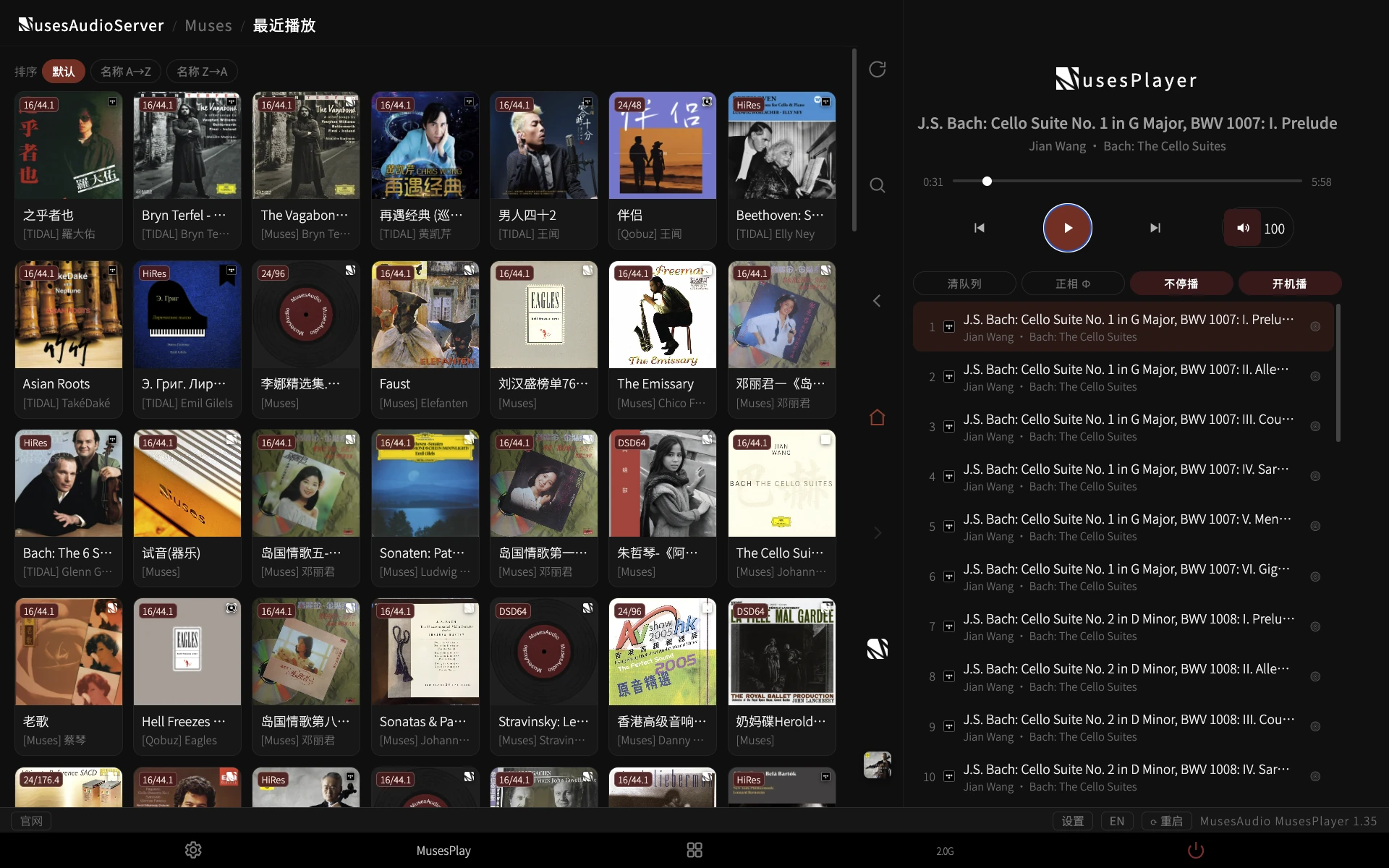
Random Albums draws complete albums from "Albums" and "Shares & USB"; Recently Played takes you straight back to what you heard last.
Tap "Search" and type "bach" — results come from local and streaming together, no per-library hunting.
Same name, highest-bitrate version wins; add-only, never delete. Writes happen immediately, album by album, with automatic resume after interruption. Switching streaming services no longer means re-favoriting everything.
A player doesn't have only one shape. Choose the output that matches your existing system — no need to buy new hardware just for software.
MusesPlayer supports four kinds of audio rendering outputs:
Unlike Roon, MinimServer, Asset UPnP, or LMS — where you build and maintain the library yourself — MusesRender ships the rendering output together with MusesMediaServer's hardware and system, with less deployment and background fuss.
Just fill in the HQP address under Settings → Players. Built for the HQPlayer Control API — library, queue, and output control all in one web page. Easy to deploy, easy to set up, easy to upgrade.
Standard UPnP devices on the same network segment are discovered automatically at boot or on refresh — including UPnP-capable DACs/renderers such as MSB and dCS.
High-quality browser audio output extends where MusesPlayer fits: a phone feeding Bluetooth headphones, casting to compatible devices via AirPlay, or turning the device running the browser into your personal audio server — music follows you, even to the car.
Not just one output address — everyday control converges into a single playback workflow.
Convenience isn't "a clean interface" — it's one fewer step in the actions you use daily.
Automatically resumes your last playlist at startup; with no history, a local random radio opens the session.
When the playlist ends, random tracks from the library pick up seamlessly — the room never falls suddenly silent.
Don't know what to hear today? Draw a random album from "Albums" or "Shares & USB". The random pool can be narrowed by genre, and falls back to the whole library when empty.
Wondering what's playing? Tap "View Album" to jump from the current track to its record.
Local, shared, and streaming play history lives in one place — resume listening without searching again. An entry you'll use every day.
Some recordings really are out of phase. Some DACs can switch it — but you have to walk up to the machine. Now a tap on the playback page flips normal/inverted phase instantly, without stopping the music.
Cross-library linking, album recommendations, and album/artist associations carry you naturally from one record to the next.
The "Also available on" badge on album pages links the Muses local library, Qobuz, and TIDAL — certain and uncertain matches marked separately. One tap on the badge jumps to that library's version.
Other albums by related artists, recommended albums, and similar artists — discover the next record from the current one, instead of landing back at an empty search box.
Performers, composers, orchestras — every name leads to an artist page showing albums from local/USB, Qobuz, and TIDAL, plus artist photos.
Browse artist album recommendations and Wikipedia entries. Albums with an official digital booklet open for reading directly.
Runs on a single-core x86_64 or arm64; dual-core with 2 GB recommended. Actual performance varies with library size, sharing protocol, and storage environment.
Double-click to run on Windows/macOS; bare-metal on Linux; Docker on fnOS, Synology, QNAP, and other NAS.
Library, players, output rates, and cache directories are all configured in the browser settings page. Upgrades keep your configuration — nothing to redo.
Free activation codes last 182 days and renew free without limit; supporters get a permanent license that never needs renewal.
Free to use; local, network-share, and USB playback have unregistered quotas, and streaming sign-in is unavailable.
Lifts the local library size limit and lets you sign in to your own Qobuz/TIDAL accounts; MusesRender excluded. Free activation codes last 182 days and are renewable.
Buy the developer a coffee and get full MusesPlayer features with no expiry.
Adopted suggestions or the first confirmed report of a real bug earn a permanent supporter license; other valid feedback earns a six-month extension, judged manually. See the feedback rules
Windows · macOS · Linux · Docker
Install and complete first-time setup for your environment
Lift the local library limit and sign in to your own Qobuz/TIDAL accounts
MUSESAUDIO · MUSESPLAYER
Great sound, one web page away.